Leave in Roster is a request the worker makes and a manager decides. A pending request shows on the schedule as a dashed "Pending leave" chip so you see it coming, but nothing is blocked until you approve.
Links on this page go straight into the app; if you're not signed in you'll be asked to log in first.
Requesting leave (workers)
Open Leave and tap Request. Pick the type and the dates, untick All day for a time window such as a two-hour appointment, and add a note if it helps. Calling in sick for a shift? Can't make it, then Sick or Family, on the shift itself opens a leave request already filled in.
The types match Australian award language:
- Annual leave
- Personal / carer's leave
- Compassionate leave
- Community service leave
- Long service leave
- Time in lieu
- Unpaid leave
You can ask for dates up to a year ahead, and up to 30 days back for a sick day you forgot to log. If your venue has more than one manager you can pick who to ask; any manager can still approve it.
A request stays editable until a manager decides it. Open it from Leave to change the dates or withdraw it. You can also cancel leave that's already approved: your manager is told, and any shifts you came off when it was approved aren't handed back automatically.
Deciding requests (managers)
Requests arrive in Requests, oldest first, alongside shift swaps. Each card shows:
- when it was made, for example "Requested Wed 3 Sep, 8:12am (6 days ago)", and which manager was asked, so competing requests are decided in the order they came in
- Already off these days: teammates with approved leave, or all-day unavailability, on any of those dates
- Also asked for these days: teammates with a pending request for the same dates, listed separately so a later request never reads as an existing clash against an earlier one
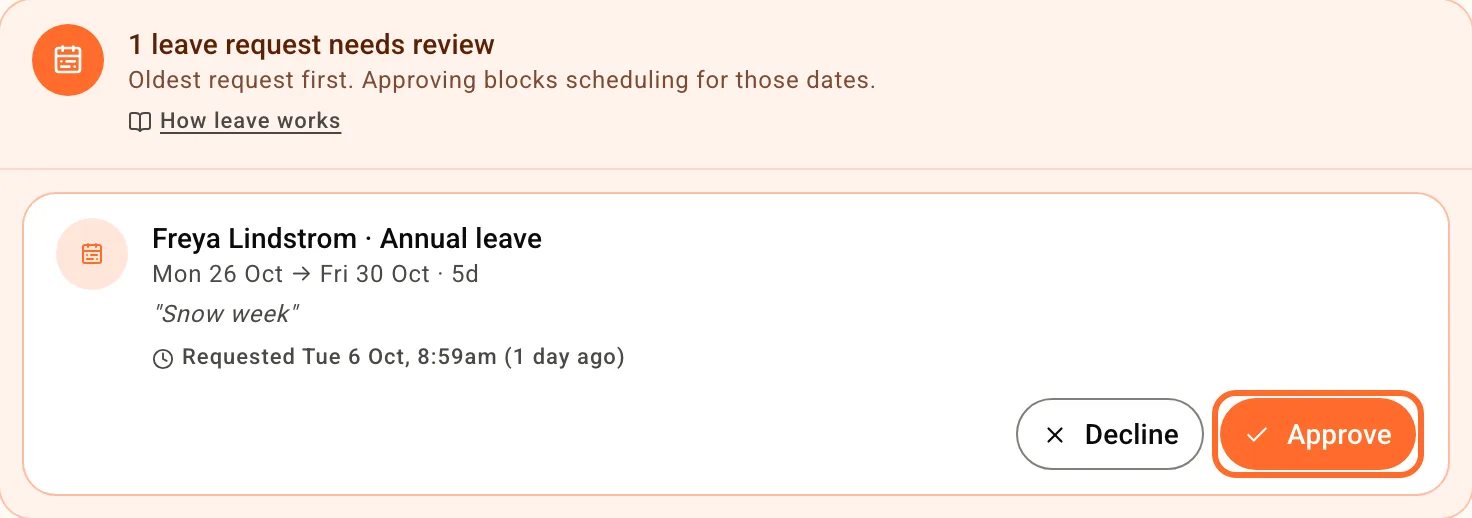
Tap Approve or Decline. The worker is told either way; a decline can carry a short reason they see. Approving blocks scheduling for those days: the person shows as on leave on the schedule and Roster refuses to drop a shift on them. Shifts they already hold on those days are taken off them and left on the schedule as unfilled, so you can re-cover them; shifts already worked, Supp marketplace shifts and trial shifts are left alone. Each unassignment is in the Activity Log, where it can be reverted.
Approved leave that hasn't ended yet sits under Approved upcoming on the same page. Cancel re-opens the days and tells the worker; it doesn't put them back on the shifts they lost. Clicking a leave marker on the schedule opens the same details. Approved leave can also flow to your payroll system: see Integrations.
Someone was rostered but never clocked in? Record sick, unpaid or other leave against that shift from the missed-shifts list on Timesheets.
Limiting how many people can be off at once
Open Settings, Venue, Scheduling and set Most people off on one day, whole venue under Time off. Leave it blank for no limit.
Once a day has that many people off, a worker who asks for it is told at the point of asking:
Enough people are already off on Thu 24 Dec and Fri 25 Dec - your venue allows 2 people off a day. Pick other days, or talk to your manager.
What counts towards the number:
- Approved leave on that day, including part-day leave (a two-hour appointment still uses a slot)
- Pending leave requests for that day, so the queue works first-come
- All-day unavailability a worker has marked for that day
What doesn't:
- Repeating weekly unavailability, like "never Tuesdays". That's a standing pattern, not days off.
- Days that have already passed, so a forgotten sick day can still be recorded.
- The person asking. Editing a request within days you already hold is never refused.
The limit applies to workers asking, for leave and one-off all-day unavailability alike. You can still approve a request over the line. It's a guard on asking, not on your decision.
Different limits for different teams
If your kitchen and your floor need their own numbers, set a limit per area under the venue-wide one, on the same settings page. A per-area limit applies to team members whose home area is that area, and the refusal says whose team is full:
Someone from Kitchen - BOH is already off on Thu 24 Dec - your venue allows 1 from Kitchen - BOH off a day. Pick another day, or talk to your manager.
Set a person's home area on their profile on the Team page, next to their primary role. Roster filled it in once, in September 2026, for anyone who mostly worked one area; everyone else, and anyone added since, starts blank. Someone with no home area is held only to the venue-wide number, and the settings page tells you how many people that is.
Both limits apply at once: someone from the kitchen is refused if the kitchen is full or the whole venue is.
Leave and unavailability are different things
Availability is where a worker records when they can't work: a repeating pattern, or one-off dates. It needs no approval and shows as a warning when you roster over it - you can still do it.
Leave is typed, requested, and approved. Approved all-day leave blocks the day outright; part-day leave blocks just that window.
Related
- Schedule colour coding - how leave, pending leave and unavailability look on the roster
- All FAQs - setup and how the rest of Roster works